Build and Measure a Minimal TEE Workload
What you will learn
This lesson covers:
- Development and production modes
- Simulators
- Build inputs
- Measurements
- Reproducible builds
- Signed images
- Reference values
- CI verification
Start with a small application
The first TEE application should perform one clear security function.
Examples include:
- Hash a protected input
- Sign a message after policy validation
- Decrypt and transform one document
- Compare two private values
- Generate a key inside the TEE
Avoid beginning with:
- Full database
- Large AI stack
- Multiple microservices
- Complex blockchain protocol
- Several external dependencies
A small first workload makes the measurement and trust boundary easier to understand.
Development modes are not production modes
TEE platforms often provide development or debug modes.
Debug mode may allow:
- Attaching a debugger
- Viewing protected state
- More detailed logs
- Relaxed signing rules
- Special host access
These features are useful for development but may weaken the security guarantee.
AWS documents that Nitro Enclaves launched with debug or console options produce attestation documents with zeroed PCR measurements. Gramine documentation also distinguishes debug configurations from production configurations and warns against using insecure debugging options for production enclaves.
Simulation is for functionality
A TEE simulator can test:
- Application logic
- Message formats
- Host communication
- Policy handling
- Error paths
- Deployment scripts
A simulator does not provide:
- Hardware memory isolation
- Real hardware attestation
- Hardware key derivation
- Real microarchitectural behaviour
- Real firmware state
- Protection from the host
Label simulated evidence clearly. Never allow production key services to trust simulator evidence.
What creates a measurement?
A workload measurement may depend on:
- Binary
- Kernel
- Boot image
- Runtime
- Manifest
- Configuration
- Initial memory pages
- File hashes
- Image certificate
- Security version
- Debug state
The exact inputs depend on the platform.
AWS Nitro Enclave attestation can report measurements for the enclave image, kernel and bootstrap, application, parent role, instance identity, and signing certificate through different PCR values.
Build identity and source identity are different
A source-code repository may contain approved code. A measurement represents a built artifact.
Between the source and the measurement are:
- Compiler
- Linker
- Dependencies
- Build flags
- Base image
- File ordering
- Timestamps
- Build scripts
- Packaging
- Signing
A clean source repository does not prove that the running binary came from that source.
Reproducible builds
A build is reproducible when the same source code, build environment, and build instructions can recreate bit-for-bit identical specified artifacts.
Reproducible builds create a path for independent parties to compare a published binary with the source from which it was claimed to be built.
Reproducibility may require controlling:
- Compiler version
- Dependency versions
- Build container
- Locale
- File timestamps
- File ordering
- Build path
- Environment variables
- Random build identifiers
- Network-fetched dependencies
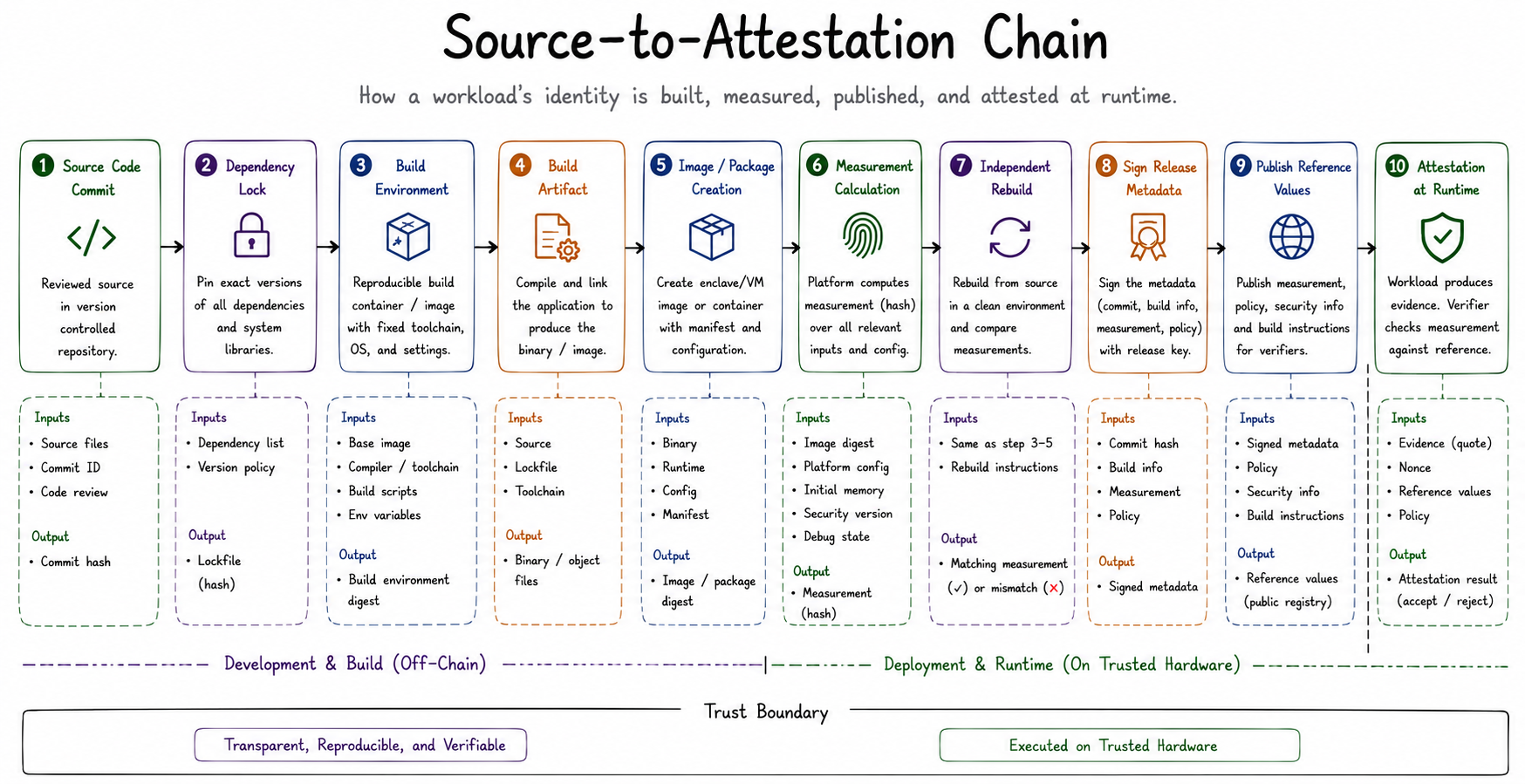
A measurement publication flow
A strong publication process may look like:
1. Review source-code commit. 2. Pin dependencies. 3. Define build environment. 4. Build the artifact. 5. Calculate the measurement. 6. Rebuild independently. 7. Confirm identical artifact or measurement. 8. Sign the release metadata. 9. Publish source commit, build instructions, measurement, and policy. 10. Add the measurement to the verifier's accepted values.
Exact measurement versus signer identity
Exact measurement policy
The verifier accepts only one exact code or image measurement.
- Benefit: Narrow authorization
- Cost: Every build or update may create a new accepted value
Signer policy
The verifier accepts images signed by an approved signing authority.
- Benefit: Easier updates
- Cost: Security depends heavily on the signing key and update controls
A practical policy may combine:
- Approved signer
- Minimum security version
- Allowed configuration
- Debug disabled
- Revocation list
- Optional exact image measurement
Build pipeline example
`` Repository ↓ Pinned build container ↓ Dependency verification ↓ Compile application ↓ Create enclave or VM image ↓ Calculate measurement ↓ Independent rebuild ↓ Sign release metadata ↓ Publish accepted reference value ``
CI policy example
A continuous-integration pipeline should fail when:
- Dependency lockfile changes without review
- Debug mode is enabled
- Signing key is unavailable through approved process
- Rebuild produces a different measurement
- Unexpected files enter the image
- Security version decreases
- Base image is not approved
- Test evidence is sent to production policy
Protect the signing key
A workload-signing key may authorize code to receive secrets.
Protect it using:
- HSM
- Threshold approval
- Offline signing
- Short-lived signing service
- Multi-person release control
- Audit log
- Key rotation
- Revocation procedure
If the signing key is compromised, an attacker may sign a malicious workload that looks authorized under a signer-based policy.
Practical build checkpoint
Create a small protected service that:
1. Receives a message. 2. Calculates a hash. 3. Signs the hash with a key generated inside the protected environment. 4. Returns the signature. 5. Produces attestation evidence binding the application identity to a public key.
The learning goal is not the hashing function. The learning goal is understanding how source, binary, measurement, evidence, and policy connect.
Common mistakes
Key takeaways
- Begin with a small workload.
- Keep development and production identities separate.
- A measurement identifies a built state, not source code directly.
- Reproducible builds connect source to binary more strongly.
- Reference values must be protected and reviewed.
- Signing keys are part of the TCB.
Check your understanding
1. Why can two builds from the same source produce different measurements? 2. What does a simulator fail to provide? 3. What is a reproducible build? 4. Why is a signing key a critical security asset? 5. What should happen when a production measurement changes?
Answer the quiz correctly to continue →
Two teams compile the same verified source commit and produce different measurements. What is the most likely cause?